KBros Transcribe: Clean up a recording, then read it in any language, free.
Takes the noise and echo out of a voice note, recording or video, then turns the speech into text, free on your own device or instantly with Cloud, in about 99 languages, and translates it into 55.
Free, with every feature. Version 1.2.3 · Mac, Windows and Android
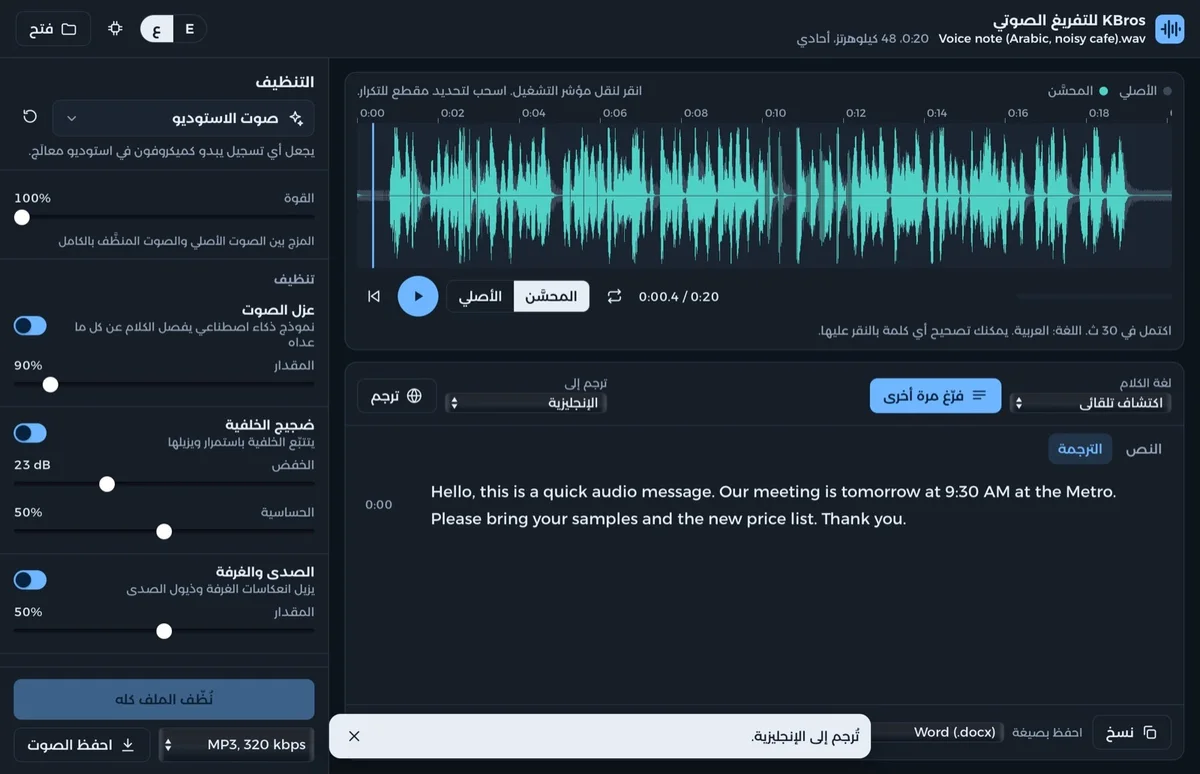
Illustrative preview: a noisy Arabic voice note, cleaned up, written down and translated into English.
What it does
KBros Transcribe in a minute
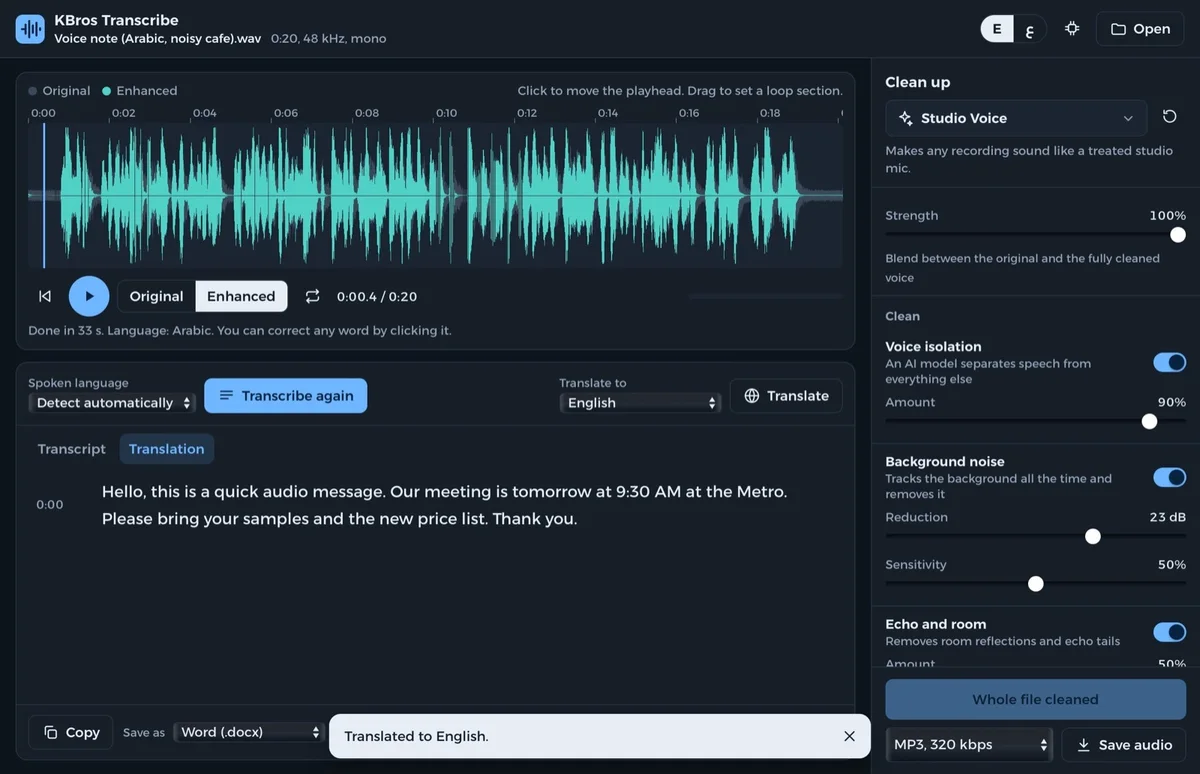
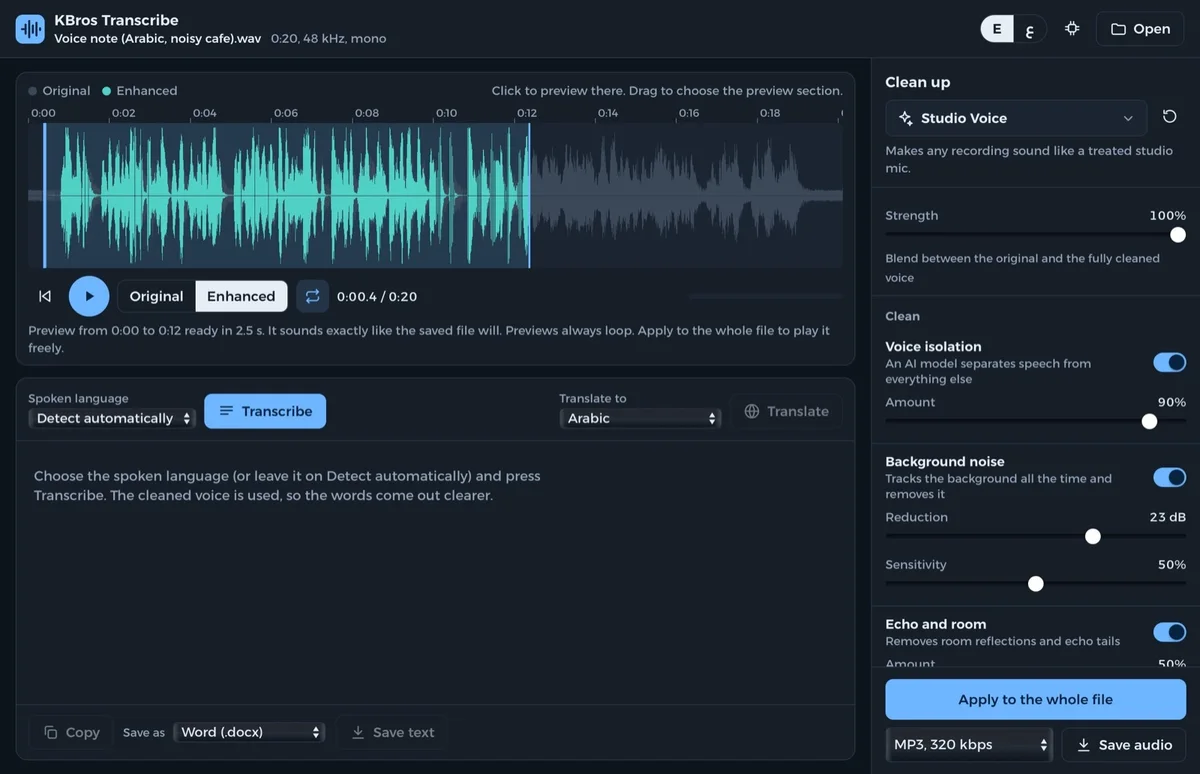
Open a WhatsApp voice note, an interview, a lecture or a video. KBros Transcribe takes out background noise, room echo, hum, mouth clicks, pops and loud breaths, evens out the level and brings back the highs that phone recordings lose. Click anywhere on the recording to hear a preview exactly as it will be saved, switch between Original and Enhanced with one key, then save it as MP3 or WAV.
Press Transcribe and the cleaned voice becomes text in about 99 languages found by themselves, Gulf and Levantine Arabic included. Choose how: free and private on your own device, or Cloud, instant, with your own free Groq key, where the text comes back in a second or two and words appear while you record. Click a line's time to hear it, correct any word, translate the whole text into one of 55 languages, and save it as Word, plain text or subtitles.
⚡ Instant text with Cloud
Turn on Cloud with your own free Groq key and your words come back in a second or two, and appear live while you record. The free engine on your device stays for private, offline use.
Quick settings where you start
Speech engine, spoken language, translation, app language and theme sit right on the home screen, with a gear to manage, update or remove the engines.
Studio sound from any recording
Voice isolation, noise and echo removal, clicks, hum and pops, breath control and broadcast loudness, in eleven presets (WhatsApp note, car, street, lecture, meeting and more) or your own.
Record, then keep it all in a project
Record in the app, add many voice notes, join them, and save everything as a .kbtr project, or as a package with the audio inside.
One-tap job presets
Pick “Arabic voice note → English”, “Meeting → Word” or your own: languages, clean-up and formats are set in one tap. Careful listening catches fast, mumbled Arabic.
Text in about 99 languages
Arabic dialects, English, French, Urdu, Hindi and many more, found by themselves, with a time on every line.
Translate into 55 languages
Google's TranslateGemma model translates the transcript on your computer, line by line, ready for subtitles.
Save it the way you need
MP3 or 24-bit WAV for the sound; Word, plain text, SRT or WebVTT subtitles for the words.
Private, in English and Arabic
Cleaning and translation always stay on your device, and transcription too unless you turn on Cloud. Only the engines download, once.
See it at work
A look inside
Real screens from KBros Transcribe.
Cleaned, written down and translatedHear the cleaned voice before you saveIn Arabic, right to left
Download
Download, free
Every feature, no account, no ads. Pick your platform.
The first time, choose how speech becomes text: the free engine on your Mac (874 MB, once, private) or Cloud, instant, with your own free Groq key. The translation engine (2.5 GB) is optional, and cleaning up audio works straight away.
In English and Arabic.
Verify this download
SHA-256 fingerprint. In Terminal, run shasum -a 256 ‹file› and compare.
New on Windows: tell us if anything does not work, and we will fix it quickly. Contact us
Windows may show “Windows protected your PC” the first time. Choose More info, then Run anyway (see the guide).
Open the file and click Install when it offers. The first time, choose the free speech engine on your PC (874 MB, once) or Cloud, instant, with your own free Groq key. The translation engine (2.5 GB) is optional.
In English and Arabic.
Verify this download
SHA-256 fingerprint. In PowerShell, run Get-FileHash ‹file› -Algorithm SHA256 and compare the Hash it shows. PowerShell writes it in capital letters; the value is the same.
To open a WhatsApp or Telegram voice note, long-press it, tap Share and choose KBros Transcribe.
The first time, choose the free speech engine on your phone (874 MB, once; Wi-Fi is best) or Cloud, instant, with your own free Groq key. The translation engine (2.5 GB) is optional.
In English and Arabic.
Verify this download
SHA-256 fingerprint. In Terminal, run shasum -a 256 ‹file› and compare.
Yes, for everyone: every feature, with no account, no ads and no time limit, and it stays free.
Does it upload my recordings?
Not unless you choose Cloud. Cleaning, translation and the free speech engine all run on your device, and the only downloads are the engines, once. With Cloud on, the sound of each note you transcribe goes to Groq over an encrypted connection to be written out, using your own key.
How do I turn on Cloud, instant?
In the app, pick Cloud, instant in Quick settings and follow the four steps: open console.groq.com/keys, sign in with Google or your email (free, no card), tap Create API Key and copy the key, then tap Paste in the app. Groq's free plan covers up to 8 hours of sound a day; beyond that it is $0.111 per hour of sound, billed by Groq. KBros charges nothing.
Which files can it open?
Voice notes from WhatsApp and Telegram (.ogg, .opus), iPhone and Android recordings (.m4a, .aac, .amr), MP3, WAV and FLAC, and the sound of videos (.mp4, .mov).
Which languages does it understand?
About 99 for transcription, found by themselves or picked from the list, and 55 for translation, Arabic and English included.
Can I open a WhatsApp voice note on my phone?
Yes. In WhatsApp or Telegram, long-press the voice note, tap Share and choose KBros Transcribe. On a computer, save the voice note and drop it on the window.
Type your email or add your profile links: KBros Footprint checks leak lists, hacked-computer records, spam blacklists, data companies, the web and the Internet Archive, then shows what is out there about you, where each finding came from and how to clean it up.
Type any name and see it written in Arabic calligraphy, from Naskh, Thuluth and Diwani to Kufi and Nastaʿlīq. Add vowel marks and ornaments, move or turn any letter, then save it as a picture, SVG or PDF.
Make a QR code for a link, Wi-Fi, a contact card, WhatsApp, email, a phone number or text. Pick one of 76 designs or make your own, add a logo and a label, and download PNG, SVG or PDF.
Merge PDFs, split them, reorder, turn or delete pages in a page grid, make PDFs smaller, turn pictures into a PDF or save pages as pictures. Your files never leave your device.
Drop a photo and the background is removed in seconds, right in your browser. Fix the edges with a brush, put it on a colour, a blur or another photo, and download a transparent PNG.
Pick colours or take them from your logo, see every tint and shade, check text contrast on light and dark, and save CSS variables, JSON, Adobe swatches, an Office theme or a swatch sheet.
A quick search window for your whole computer, your drives and network folders: results grouped by kind, newest first, with your recent folders on top.
Find any photo on your Mac by describing it, by a similar photo or by a face, in English or Arabic, then put it straight into PowerPoint, InDesign or Photoshop.
A menu-bar app that keeps your folders backed up to OneDrive, Google Drive, iCloud Drive, Dropbox or any drive, and never permanently deletes anything.
Freeuntil 31 Dec 2026$19.99(AED 75)from 1 Jan 202750% off, 1 to 14 Jan