
KPT Quick Access app icon

KPT Quick Access

Designer toolbar

Inside PowerPoint

KPT Quick Access: The tools designers reach for, one click away in every deck, free.

Fills PowerPoint's Quick Access Toolbar with designer tools: align, distribute, merge shapes, colours, pictures and more.

Free gift · Every feature
  • PowerPoint for Mac
  • PowerPoint for Windowsbeta

Updated 20 Nov 2026 · Replaces PowerPoint's toolbar with the 34 tools as soon as it installs, on Mac and Windows: quick messages that close by themselves

Freefor everyone

Free, with every feature. Version 1.2.4 · PowerPoint for Mac and Windows

Animated preview of KPT Quick Access
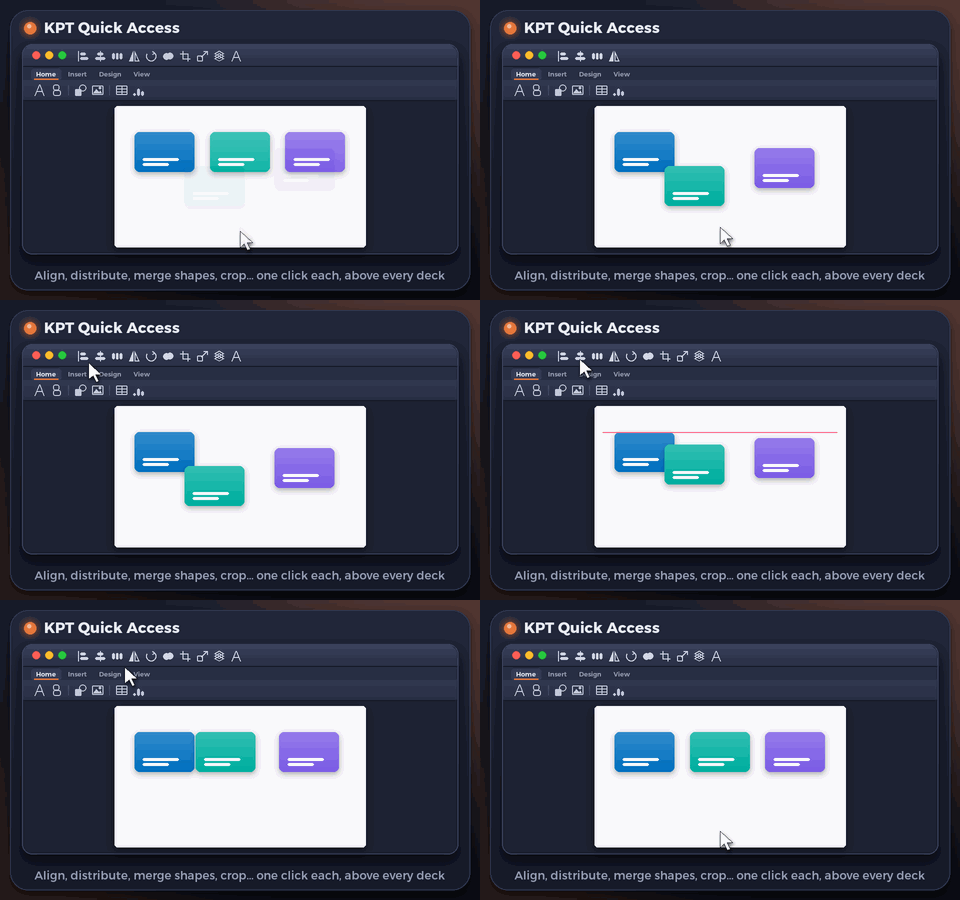
Illustrative preview: the designer tools sit in the toolbar above every tab.

What it does

KPT Quick Access in a minute

KPT Quick Access sets up PowerPoint's Quick Access Toolbar, the row of small buttons at the top of the window, with 34 tools designers use all day. Align and distribute, group and arrange, merge shapes and change a shape, fill and outline colours, picture from file, crop to shape and remove background, the slide master and more, always one click away whatever tab is open.

Your own toolbar is kept: the installer saves it first, and the uninstaller puts it back exactly as it was. It is free for everyone, for PowerPoint for Mac and PowerPoint for Windows.

  • Always visible

    The toolbar stays at the top whichever ribbon tab is open.

  • Align and distribute

    Six alignments and two distributions in a row.

  • Arrange and flip

    Group, ungroup, bring to front or send to back, and flip, without opening a menu.

  • Merge shapes

    Union, combine, fragment, intersect and subtract, plus Change Shape and Edit Points.

  • Colours and pictures

    Fill, outline and Format Painter; picture from file, crop to shape, fill or fit, remove background.

  • Your toolbar kept

    Saved before install and restored if you uninstall.

Download

Download, free

Every feature, no account, no ads. Pick your platform.

PowerPoint for MacFree

KPT Quick Access for PowerPoint

Version
1.2.4
Size
439 KB
Requires
PowerPoint for Mac (tested with 16.115)
Runs on
Apple silicon and Intel
Download free.pkg · 439 KB
  • Asks you to quit PowerPoint and for your Mac password. When macOS asks about KPT Quick Access, click OK or Allow. Open PowerPoint: the 34 tools are in the Quick Access Toolbar above the ribbon. Your own toolbar is backed up first.
Verify this download

SHA-256 fingerprint. In Terminal, run shasum -a 256 ‹file› and compare.

KPT-Quick-Access-1.2.4.pkg
3b26da1772d9423c8e556aa4284cf0db4f4cfe4141d46ee2e7b831461062c1b9


PowerPoint install guide

PowerPoint for WindowsFreeBeta

KPT Quick Access for PowerPoint on Windows

Version
1.2.4
Size
5 KB
Requires
PowerPoint for Windows (Microsoft 365 or 2021 and later)
Runs on
Intel and AMD PCs; ARM PCs through Windows' built-in emulation
Download free.zip · 5 KB

New on Windows: tell us if anything does not work, and we will fix it quickly. Contact us

  • Extract the zip, close PowerPoint, double-click the Install .cmd file, then open PowerPoint: the 34 tools are in the Quick Access Toolbar. Your own toolbar is backed up first.
Verify this download

SHA-256 fingerprint. In PowerShell, run Get-FileHash ‹file› -Algorithm SHA256 and compare the Hash it shows. PowerShell writes it in capital letters; the value is the same.

KPT-Quick-Access-Windows-1.2.4.zip
cc4aaa6082bd55c1f0434e1a87cbf594b65e07bd3c3c447a245b489c407f7e23

PowerPoint for Windows install guide

A gift

Free for everyone

KPT Quick Access is free for everyone: all 34 tools, now and later.

  • All 34 tools, nothing locked.
  • No account and no ads.
  • Your own toolbar is saved first.

If KPT Quick Access saves you a few clicks in every deck, you can support KHBROS™ and help us make more.

Support KHBROS™

FAQ

Questions, answered

Is KPT Quick Access really free?

Yes, for everyone: all 34 tools in PowerPoint for Mac and Windows, with no account, no ads and no time limit, and it stays free.

What happens to my own toolbar?

The installer saves it first. Uninstalling puts it back exactly as it was.

Does it add a ribbon tab?

No. It only arranges the Quick Access Toolbar, the small buttons at the very top of the PowerPoint window.

KPT Quick Access is an original KHBROS™ work, © 2026 KHBROS™. Its name, design, features and code are protected by copyright and may not be copied or imitated. Copyright notice

More from KHBROS™

More PowerPoint add-ins

All of PowerPoint add-ins · All 29 apps

  • Free · Every feature
    Inside PowerPoint

    KPT: The PowerPoint toolkit

    The PowerPoint toolkit

    Text, arrange and table tools that save clicks on every deck.

    Freeuntil 31 Dec 2026$49.99 (AED 185)from 1 Jan 202750% off, 1 to 14 Jan

    • PowerPoint for Mac
    • PowerPoint for Windowsbeta
  • Free · Every feature
    Inside PowerPoint

    KPT Style: Colour and scale

    Colour and scale

    Ten palettes, a contrast guard that keeps text readable, and Scale by % for PowerPoint.

    Freeuntil 31 Dec 2026$19.99 (AED 75)from 1 Jan 202750% off, 1 to 14 Jan

    • PowerPoint for Mac
    • PowerPoint for Windowsbeta
  • Free · Every feature
    Inside PowerPoint

    KPT Pen Lab: Pen and vector tools

    Pen and vector tools

    A see-through pen layer for PowerPoint. Draw, then place your drawing as native shapes.

    Freeuntil 31 Dec 2026$29.99 (AED 109)from 1 Jan 202750% off, 1 to 14 Jan

    • PowerPoint for Mac
    • PowerPoint for Windowsbeta
  • Free · Every feature
    Inside PowerPoint

    KPT Retouch: Offline AI picture editing

    Offline AI picture editing

    Photoshop-style edits and generative AI that run on your Mac, plus optional online tools.

    Freeuntil 31 Dec 2026$29.99 (AED 109)from 1 Jan 202750% off, 1 to 14 Jan

    • PowerPoint for Mac
    • PowerPoint for Windowsbeta