KBros PDF Editor app icon

KBros PDF Editor

PDF editor

Standalone appULTIMATE

KBros PDF Editor: Comment on, fill in and organise PDFs, free and private.

A PDF editor for Mac and Windows: comments and drawings, form filling, page organising and combining files, all on your computer.

BASIC · Free
  • Mac
  • Windowsbeta

BASIC is free. Version 1.0.0 · Mac and Windows

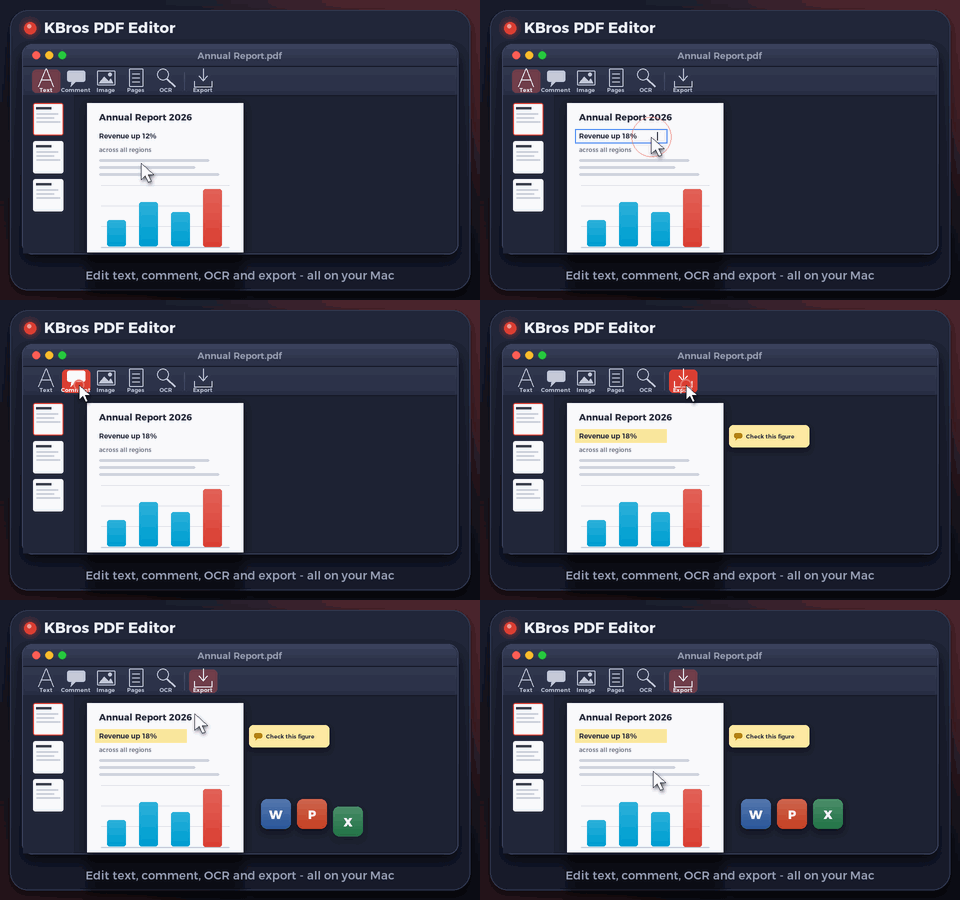
Animated preview of KBros PDF Editor
Illustrative preview.

What it does

KBros PDF Editor in a minute

KBros PDF Editor opens any PDF in a clean window with page thumbnails. Highlight, underline or strike out text, add notes, text boxes, shapes, arrows, freehand drawings and stamps, and fill in the PDF's own form fields. Everything you add is saved in the file, so it shows in any PDF reader.

The Pages view organises the document: insert blank pages or pages from another PDF or a picture, delete, rotate, move, duplicate, extract and replace them. Combine several PDFs and pictures into one PDF, with a bookmark for each file, and save any page as a picture. Every change can be undone.

  • Comments that show everywhere

    Highlights, notes, text boxes, shapes, arrows, drawings and stamps, saved in the PDF.

  • Fill in forms

    Type into a PDF's own fields and tick its boxes; what you type is saved with the file.

  • Organise pages

    Insert, delete, rotate, move, duplicate, extract and replace pages from the thumbnails.

  • Combine files

    PDFs and pictures into one PDF, with a bookmark for each file.

  • Undo anything

    Every change is its own step, so Undo always takes you back.

  • Private and small

    Everything happens on your computer. Nothing is uploaded, and the Mac download is under 2 MB.

Download

Download BASIC, free

No account, no time limit. Pick your platform.

MacFree

KBros PDF Editor Basic for Mac

Version
1.0.0
Size
1.9 MB
Requires
macOS 13 Ventura or later
Runs on
Apple silicon and Intel
Download BASIC (free).pkg · 1.9 MB
  • Installs KBros PDF Editor Basic in Applications. Open a PDF with it, or choose File > Open.
Verify this download

SHA-256 fingerprint. In Terminal, run shasum -a 256 ‹file› and compare.

KBros-PDF-Editor-Basic-1.0.0.pkg
4c23d99d72d6ce972019e3531c1611355d36f669fa6093b4c6b237a40ea7d542

Mac install guide

WindowsFreeBeta

KBros PDF Editor Basic for Windows

Version
1.0.0
Size
93.6 MB
Requires
Windows 10 or 11 (64-bit)
Runs on
Intel and AMD PCs; ARM PCs through Windows' built-in emulation
Download BASIC (free).exe · 93.6 MB

New on Windows: tell us if anything does not work, and we will fix it quickly. Contact us

  • Windows may show “Windows protected your PC” the first time. Choose More info, then Run anyway (see the guide).
  • Open the file and click Install when the app offers it. Then choose File > Open, or drop a PDF on the window.
Verify this download

SHA-256 fingerprint. In PowerShell, run Get-FileHash ‹file› -Algorithm SHA256 and compare the Hash it shows. PowerShell writes it in capital letters; the value is the same.

KBros-PDF-Editor-Basic-Windows-1.0.0.exe
1ea51da03fa9e4ed3ce4fe473e458d7dcf1473ac3f6c91fb1276aba42bdca44f

Windows install guide

BASIC and ADVANCED

What is in each edition

Everything in BASIC, plus editing the PDF's own text and pictures, form design, links, videos, text recognition (OCR) and export to Word, PowerPoint and Excel.

Free

BASIC

Free, no account, no time limit.

  • Read, search and print PDFs
  • Comments, highlights, drawings and stamps
  • Fill in forms
  • Organise pages and combine files
  • Save pages as pictures
ADVANCED

ADVANCED

Everything in BASIC, plus:

  • Edit the PDF's own text
  • Pictures and shapes
  • Form design
  • Links and videos
  • Word, PowerPoint and Excel
  • Text recognition (OCR)
  • Crop, split and make smaller

Waitlist

ADVANCED: coming soon. Join the waitlist.

We are finishing our UAE business licence before we open sales. Join the waitlist and we will email you the day ADVANCED opens.

  • KBros PDF Editor is already selected for you.
  • One email when it opens. No newsletters.

We will only email you about ADVANCED and the apps you pick, and you can ask us to remove you at any time. See the privacy policy.

FAQ

Questions, answered

What is in BASIC?

Reading and search, comments and drawings, form filling, page organising, combining PDFs and pictures, and saving pages as pictures, free. ADVANCED adds editing the PDF's own text and pictures, form design, links, videos, OCR and export to Word, PowerPoint and Excel.

Will others see my comments?

Yes. Comments, drawings and form entries are saved inside the PDF, so they show in Preview, Acrobat and other PDF readers.

Which computers does it run on?

Any Mac with macOS 13 Ventura or later (Apple silicon or Intel), and 64-bit Windows 10 or 11 (beta). Everything it needs is inside the app.

Are my files uploaded?

No. Everything happens on your computer.

KBros PDF Editor is an original KHBROS work, © 2026 KHBROS. Its name, design, features and code are protected by copyright and may not be copied or imitated. Copyright notice

More from KHBROS

More in ULTIMATE

All of ULTIMATE · All 12 apps

  • BASIC · Free
    Inside PowerPoint

    KPT: The PowerPoint toolkit

    The PowerPoint toolkit

    Text, arrange and table tools that save clicks on every deck.

    • PowerPoint for Mac
    • PowerPoint for Windowsbeta
  • BASIC · Free
    Inside PowerPoint

    KPT Style: Colour and scale

    Colour and scale

    Ten palettes, a contrast guard that keeps text readable, and Scale by % for PowerPoint.

    • PowerPoint for Mac
    • PowerPoint for Windowsbeta
  • BASIC · Free
    Inside PowerPoint

    KPT Pen Lab: Pen and vector tools

    Pen and vector tools

    A see-through pen layer for PowerPoint. Draw, then place your drawing as native shapes.

    • PowerPoint for Mac
    • PowerPoint for Windowsbeta
  • BASIC · Free
    Inside PowerPoint

    KPT Retouch: Offline AI picture editing

    Offline AI picture editing

    Photoshop-style edits and generative AI that run entirely on your Mac.

    • PowerPoint for Mac
    • PowerPoint for Windowsbeta
  • BASIC · Free
    Inside PowerPoint

    KPT Icon Library: Icons and infographics

    Icons and infographics

    A searchable panel of themed vector icons and editable infographic slides, right beside your slide.

    • PowerPoint for Mac
    • PowerPoint for Windowsbeta
  • BASIC · Free
    Inside PowerPoint

    KPT Infographics: Data to infographic

    Data to infographic

    Turns pasted data or text into a fully editable PowerPoint infographic slide, in English or Arabic.

    • PowerPoint for Mac
    • PowerPoint for Windowsbeta
  • BASIC · Free
    Inside PowerPoint

    KPT Palette: Formatting panel

    Formatting panel

    A docked panel for colour, line, size, font, paragraph and text fitting, so formatting is one click away.

    • PowerPoint for Mac
    • PowerPoint for Windowsbeta
  • BASIC · Free
    Inside PowerPoint

    KPT Quick Access: Designer toolbar

    Designer toolbar

    Fills PowerPoint's Quick Access Toolbar with designer tools: align, distribute, merge shapes, colours, pictures and more.

    • PowerPoint for Mac
    • PowerPoint for Windowsbeta
  • Free gift · Every feature
    Inside PowerPoint

    KPT Guides Off: No stray guides

    No stray guides

    Stops PowerPoint drawing guide lines through every slide of every deck you open or create.

    • PowerPoint for Mac
    • PowerPoint for Windowsbeta
  • BASIC · Free
    Inside PowerPoint

    SlideSmith: Templates that design

    Templates that design

    Upload your own PowerPoint templates, then restyle decks with them or turn text into finished slides, in English or Arabic.

    • PowerPoint for Mac
    • PowerPoint for Windowsbeta
  • BASIC · Free
    Standalone app

    Slide PRESS: Export to PDF

    Export to PDF

    Exports Office and iWork files to PDF or images with precise control of quality and size.

    • Mac
    • Windowsbeta
  • BASIC · Free
    Standalone app

    DocSmith: PDF to editable

    PDF to editable

    Turns PDFs and images into PowerPoint or InDesign files with editable text, while pictures, logos and layout stay exactly as they were.

    • Mac